You can set properties for the table using the context menu.
Right-click on the table to display the context menu.
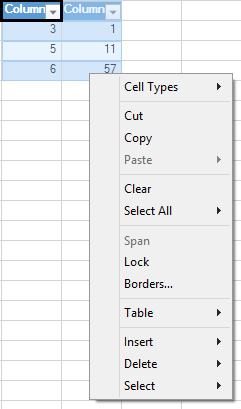
This context menu has the following items:
| Context Menu Choice | Description |
| Cell Types | You can select the cell type for the selected item. For more information, refer to Cell Type Dialog. |
| Cut, Copy, and Paste | These Clipboard operations cut, copy, and paste the selected item. |
| Clear | Clears the selected item. |
| Select All | Selects the sheet, cells, or data. |
| Span | This option does not apply to tables. |
| Lock | Locks the selected item. |
| Borders | Displays the Border Editor to allow you to edit the borders of the cells. For more information, refer to Border Editor. |
| Table | Adds a totals row or converts to a range. |
| Insert | Adds columns or rows to the table. |
| Delete | Removes columns or rows from the table. |
| Select | Selects the table column data, entire table column, or table row. |
See Also