C1WebCommand2 includes the following enhancements in the 2007 v1 release of ComponentOne Studio Enterprise:
· C1WebCommand2 is now based on Microsoft ASP.NET Extensions 1.0 Beta1
· Client javascript is optimized for better performance
· Keyboard support is provided for all controls
· Client scripts works in the headers like in the in the link items
· Expand animation effects are added to menus, treeviews and topicbars
C1WebCommand2 is now based on Microsoft ASP.NET Extensions 1.0 Beta1
C1WebCommand2 is now based on Microsoft ASP.NET Extensions 1.0 Beta1. For more information about the latest technology for Atlas, Microsoft ASP.NET 2.0 AJAX Extensions, see http://ajax.asp.net/.

Keyboard support is provided for all controls
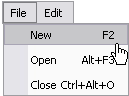
Basic keyboard support is available for all C1WebCommand2 controls through the KeyboardSupport property. Setting this property to True will enable keyboard control for the selected C1WebCommand2 control. The keyboard support adds more flexibility in navigating the C1WebCommand2 controls. In addition to the basic keyboard support C1WebCommand2 provides, it has a KeyboardShortcut property for you to specify a string for the shortcut. To make your controls more user friendly, you can enable the ShowKeyboardShortcuts to show the shortcut for each item.
The following image illustrates the ShowKeyBoardShortcuts property enabled for the menus:
For more information about the new keyboard support feature, see Access Keys and Keyboard Navigation.
Ability to Execute Client Side Script in Headers/Groups
Now you can execute arbitrary client side script through the headers/groups in the C1WebCommand2 controls like you could do for the link items in the C1WebCommand2 controls. To use this new feature, set the ClientScripts property to a specific header/group for any of the C1WebCommand2 controls.
Expand Animation Effects are Added to Menus, Treeview, Tabstrips, and Topicbars
You can apply various types of expand animation effects when the submenus in menus, nodes in treeviews, and groups in topicbars are expanding/collapsing through setting the C1WebMenu.ExpandEffect, C1WebTopicBar.ExpandEffect, or C1WebTreeView.ExpandEffect property.
Send comments about this topic to ComponentOne. Copyright © ComponentOne LLC. All rights reserved. |