You can specify the initial size of your SuperPanel. To resize the SuperPanel at design time, position your cursor over the bottom-right corner of the SuperPanel, press and hold the left mouse button, drag the SuperPanel edge to resize, and release the mouse when you are done.
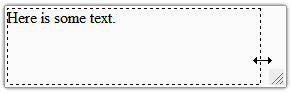
By default, the AllowResize property is set to True so you are able to resize the SuperPanel at run time. When you resize the C1SuperPanel at run time a dashed rectangular box appears as a visual cue to show you the new size of the SuperPanel before you release the mouse.
If you want to specify a fixed width and height for SuperPanel you can do so by setting the Height and Width properties and then setting the AllowResize property to False.
|