Show All
 Hide All
To conditionally format cells based on the contents, create a new style and use the CellChanged event.
- Create a new CellStyle called LargeValue and set the BackColor property to Gold.
In the Designer
- Open the C1FlexGrid Style Editor. For details on how to access the C1FlexGrid Style Editor, see Accessing the C1FlexGrid Style Editor.
- Click Add to create a new style.
- Double-click CustomStyle1, rename it LargeValue, and press ENTER when finished.
- Locate the BackColor property in the right pane and set it to Gold.
- Locate the Font property and click the ellipsis button next to it to open the Font dialog box.
- Set the Font style box to Italic.
- Click OK to close the Font dialog box.
- Click OK to close the C1FlexGrid Style Editor.
In Code
Add the following code to the Form_Load event:
To write code in Visual Basic
Visual Basic Copy Code' Create a custom style for large values. Dim cs As C1.Win.C1FlexGrid.CellStyle cs = Me.C1FlexGrid1.Styles.Add("LargeValue") cs.Font = New Font(Font, FontStyle.Italic) cs.BackColor = Color.GoldTo write code in C#
C# Copy Code// Create a custom style for large values. C1.Win.C1FlexGrid.CellStyle cs; cs = this.c1FlexGrid1.Styles.Add("LargeValue"); cs.Font = new Font(Font, FontStyle.Italic); cs.BackColor = Color.Gold; - Use the CellChanged event to format the cells based on the contents:
To write code in Visual Basic
Visual Basic Copy Code' Format cells based on their content. Private Sub C1FlexGrid1_CellChanged(ByVal sender As Object, ByVal e As C1.Win.C1FlexGrid.RowColEventArgs) Handles C1FlexGrid1.CellChanged ' Mark currency values > 50,000 as LargeValues. ' Reset others by setting their Style to Nothing. Dim cs As C1.Win.C1FlexGridCellStyle If Val(Me.C1FlexGrid1(e.Row, e.Col)) >= 50000 Then cs = Me.C1FlexGrid1.Styles("LargeValue") End If Me.C1FlexGrid1.SetCellStyle(e.Row, e.Col, cs) End SubTo write code in C#
C# Copy Code// Format cells based on their content. private void c1FlexGrid1_CellChanged(object sender, C1.Win.C1FlexGrid.RowColEventArgs e) { // Mark currency values > 50,000 as LargeValues. // Reset others by setting their Style to Nothing. C1.Win.C1FlexGrid.CellStyle cs; if (Val(this.c1FlexGrid1[e.Row, e.Col].ToString()) >= 50000) { cs = this.c1FlexGrid1.Styles["LargeValue"]; } this.c1FlexGrid1.SetCellStyle(e.Row, e.Col, cs);
This topic illustrates the following:
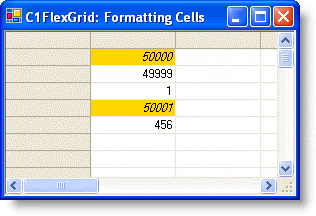
In this example, cells containing values greater than or equal to 50,000 are highlighted in gold.