Each C1NavPanelPane is made up of two distinct elements, the header area and the content area.
Header Area
The C1NavPanelPane's header area appears at the top of the control and initally displays "C1NavPanel is Empty. Click here to add new pane." You can add content, including text, HTML content, images, and other controls, to the header area of the C1NavPanelPane. Elements in the header area can be added and moved there through a simple drag-and-drop operation.
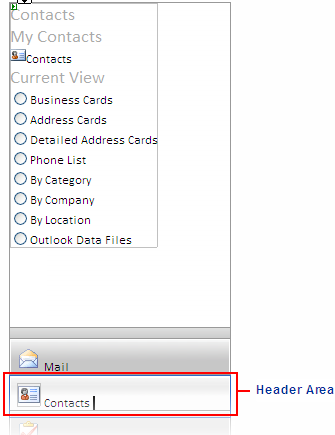
You can add content to the header area of the C1NavPanelPane at design time. Simply click the header area and begin typing.
When you add content to the header and switch to Source view, you will notice that the header appears inside <Header> tags inside the <cc1:C1NavPanelPane> tags:
<cc1:C1NavPanel ID="C1NavPanel1" runat="server" Height="300px" Width="300px">
<Panes>
<cc1:C1NavPanelPane ID="C1NavPanel1Pane1" runat="server" Expanded="True">
<Content>
content
</Content>
<Header>
Header
</Header>
</cc1:C1NavPanelPane>
</Panes>
</cc1:C1NavPanel>
Content Area
The C1NavPanelPane's content area is initially empty. You can add images, rich text through custom HTML content, URL links through the ContentUrl property, and arbitrary controls, such as buttons and labels. Elements in the content area of the control can be added and moved there through a simple drag-and-drop operation.
You can add content to the control area of the C1NavPanelPane at design time. Simply click the content area and begin typing, or add images or other elements as you would normally.
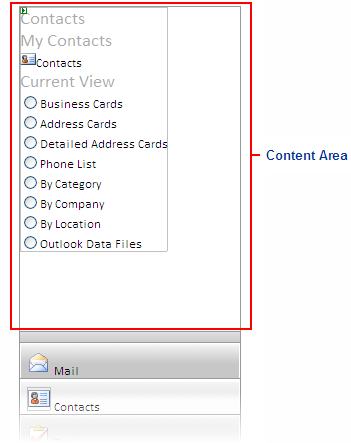
When you add content to the content area and switch to Source view, you will notice that the content appears inside <Content> tabs inside the <cc1:C1NavPanelPane> tags:
<cc1:C1NavPanel ID="C1NavPanel1" runat="server" Height="300px" Width="300px">
<Panes>
<cc1:C1NavPanelPane ID="C1NavPanel1Pane1" runat="server" Expanded="True">
<Content>
content
</Content>
<Header>
Header
</Header>
</cc1:C1NavPanelPane>
</Panes>
</cc1:C1NavPanel>
You can also use the ContentUrl property to set external content to appear within the content area of the C1NavPanelPane. For more information, see Displaying External Content.
|