Using Custom Spell Dialog Boxes
To use custom spell dialog boxes, you have to perform two tasks:
1. Create a class that derives from C1Window and implements the ISpellDialog interface.
2. Use the overloaded version of the CheckControlAsync method that takes the ISpellDialog parameter.
To make the first task easier, we provide two dialog boxes that you can use as a starting point when creating your own dialog boxes. One of them is identical to the built-in dialog box, whereas the other is similar to the spell dialog box in Microsoft Word. You can find the source code in the "SpellCheckerSample" application that is installed in the "Samples" folder along with the product.
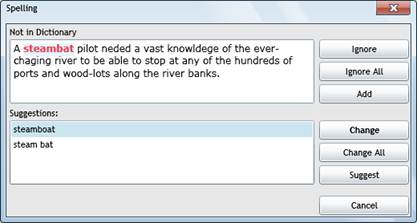
This is what the second custom dialog box looks
like: