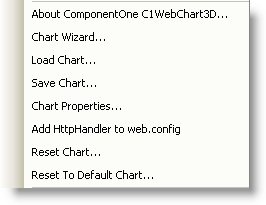
C1WebChart3D provides a context menu for additional functionality to use at design time.
To access C1WebChart3D's context menu, right-click on the C1WebChart3D control to open its context menu.
The C1WebChart3D context menu operates as follows:
•About ComponentOne C1WebChart3D
Displays the About ComponentOne C1WebChart3D dialog box, which is helpful in finding the version number of the C1WebChart3D control and online resources.
•Chart Wizard
Opens the Chart3D Wizard.
•Load Chart
Loads the saved layout of the C1WebChart3D control.
•Save Chart
Saves the layout of the C1WebChart3D control as an XML file.
•Chart Properties
Opens the Chart3D Properties designer.
•Add HttpHandler to Web.Config
Adds the HttpHandler to the Web.Config file.
•Reset Chart
Resets the WebChart.
•Reset To Default Chart
Resets the WebChart back to its default settings.