The XmlEditor for WinForms controls include a smart
tag ( ) in Visual Studio. A smart tag
represents a short-cut tasks menu that provides the most commonly used
properties in the controls.
) in Visual Studio. A smart tag
represents a short-cut tasks menu that provides the most commonly used
properties in the controls.
To access the Tasks menu, click the smart tag in the upper-right corner of the control. For example, here is the C1XmlEditor Tasks menu:
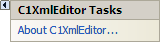
The Tasks menus is similar for all XmlEditor for WinForms controls and it operates as follows:
• About C1XmlEditor
Displays the About ComponentOne XmlEditor dialog box, which is helpful in finding the version number of the product and online resources such as how to purchase a license, how to contact ComponentOne, or how to view ComponentOne product forums.
|