This Topic Illustrates the Following:
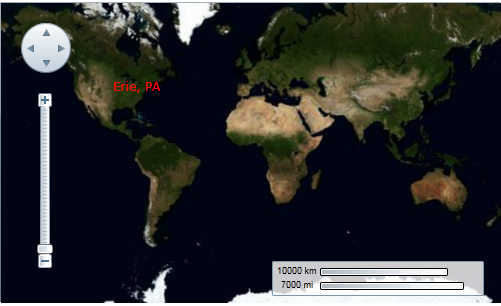
In this topic, you will add a label to a geographic point – the geographic coordinates of Erie, Pennsylvania (USA) - using a C1VectorLayer and a C1VectorPlacemark. For more information on vector layers, see Vector Layer.
In XAML
Complete the following steps:
1. Add the following XAML between the
<c1:C1Maps> and </c1:C1Maps> tags:
<c1:C1VectorLayer>
<c1:C1VectorPlacemark LabelPosition="Left" GeoPoint="-80.107008,42.16389" StrokeThickness="2" Foreground="#FFEB1212" PinPoint="-80.010866,42.156831" Label="Erie, PA"/>
</c1:C1VectorLayer>
2. Run the project.
In Code
1. In XAML view, add x:Name="C1Maps1" to the <c1:C1Maps> tag so that the object will have a unique identifier for you to call in code.
2. Enter Code view and import the following namespace:
Imports C1.Silverlight.C1Maps
•C#
using C1.Silverlight.C1Maps;
3. Add the following code beneath the InitializeComponent() method:
' Create layer and add it to the map
Dim vl As C1VectorLayer = New C1VectorLayer()
C1Maps1.Layers.Add(vl)
'Create a vector placemark and add it to the layer
Dim vp1 As C1VectorPlacemark = New C1VectorPlacemark()
vl.Children.Add(vp1)
' Set the placemark to a set of geographical coordinates
vp1.GeoPoint = New Point(-80.107008, 42.16389)
' Set the placemark's label and properties
vp1.Label = "Erie, PA"
vp1.FontSize = 12
vp1.Foreground = New SolidColorBrush(Colors.Red)
vp1.LabelPosition = LabelPosition.Center
•C#
// Create layer and add it to the map
C1VectorLayer vl = new C1VectorLayer();
C1Maps1.Layers.Add(vl);
//Create a vector placemark and add it to the layer
C1VectorPlacemark vp1 = new C1VectorPlacemark();
vl.Children.Add(vp1);
// Set the placemark to a set of geographical coordinates
vp1.GeoPoint = new Point(-80.107008, 42.16389);
// Set the placemark's label and properties
vp1.Label = "Erie, PA";
vp1.FontSize = 12;
vp1.Foreground = new SolidColorBrush(Colors.Red);
vp1.LabelPosition = LabelPosition.Center;
4. Run the project.
This Topic Illustrates the Following:
The following image shows a C1Maps control with the geographic coordinates of Erie, Pennsylvania (USA) labeled.