Gradient Colors
ActiveBar now has built-in support for GDI+, which allows you to employ gradient coloring in your applications. Now when ActiveBar fills a Band or Tool object with color a gradual change from one hue to another can take place on the band. To render Gradient Coloring in your application color scheme, the ToolbarStyle property must be set to either ddTSOffice2003 or ddTSVisualStudio2005.

Alpha Blending
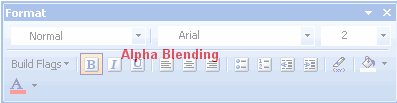
GDI+ supports Alpha Blending allowing you to create transparent bands. Using the FloatingToolbarFadeDelay or Opacity property allows you to control the transparency of the fill color of an object. The more transparent you make the fill color of an object, the more the background shows through the object.
Anti-Aliasing
ActiveBar now supports anti-aliasing. Anti-Aliasing involves creating lines of different transparencies in your application graphics to imply the definition of a line. When adding anti-aliasing to a graphic, GDI+ plots theoretical lines.The pixels rendering the lines become less transparent the closer their location is in relationship to the theoretical lines plotted by GDI+. The end result for your application graphics is rendered lines and curves that your users perceive as more smooth.

| See Also |
GDI+ Support | Microsoft Office 2000 and Office XP Look and Feel | Designing Bands | Designing Bands
Copyright © 2006 Data Dynamics, Ltd. All Rights Reserved.