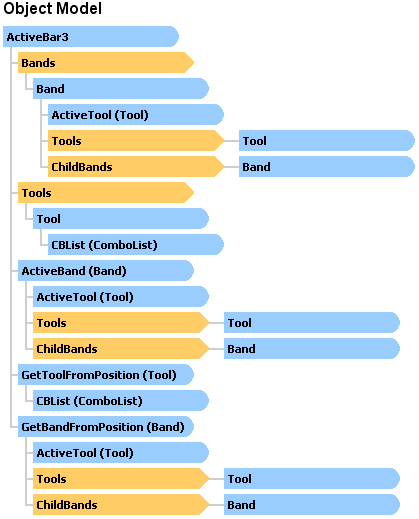
The main element for the ActiveBar 3.0 object model is the ActiveBar control. This component controls all aspects of the ActiveBar bands and tools in your layout. When you add it to a project, drag the ActiveBar control from the Visual Basic 6.0 toolbox and size it to fit the form.
Add bands such as the Toolbar, Floating Toolbar, Menu Bar, Popup Menu, or Status Bar to the ActiveBar control on your form using the ActiveBar designer. Add popup bands and link them to other bands using the SubBand property. Add Child Menu Bars, such as the Navigation Bar, using the ChildBandStyle property.
Add tools such as Buttons, Dropdown Buttons, Combo boxes, Labels, Separators, and Window Lists to a band in the tree view of the ActiveBar Designer. Band objects can also host ActiveX controls and dockable forms using the Custom property.
Drag the CustomizeListbox control from the toolbox and size it to fit your form to create a custom list box. The list box displays ActiveBar tool and band artifacts in an application allowing your users to customize the application layout.
| See Also |
ActiveBar Designer | Bands | Tools
Copyright © 2006 Data Dynamics, Ltd. All Rights Reserved.