C1ToolBar includes a rich and flexible client-side object model that allows you to set the control's properties without postback. In this topic, you'll use this feature to create a client-side script that allows users to remove toolbar item such as C1ToolBarButton, C1ToolBarDropDownList, etc from the C1ToolBar control at run-time.
To enable users to remove toolbar items from the C1ToolBar control at run-time, complete the following steps:
1. Add a ScriptManager and a C1ToolBar control to your Web page or application.
2. Click the Source tab to enter Source view.
3. Replace the markup for the C1ToolBar control within the <cc1:C1ToolBar> </cc1:C1ToolBar> tags with the following:
<cc1:C1ToolBar ID="C1ToolBar1" runat="server" Dock="None"
VisualStylePath="~/C1WebControls/VisualStyles">
<Items>
<cc1:C1ToolBarButton runat="server" Index="0" Name="" Text="ToolBarButton1">
</cc1:C1ToolBarButton>
<cc1:C1ToolBarSplitButton runat="server" EnabledDefaultButton="False" Index="1"
Name="" NestedItemIndex="0" Text="ToolBarSplitButton1">
</cc1:C1ToolBarSplitButton>
<cc1:C1ToolBarCheckButton runat="server" Index="2" Name=""
Text="ToolBarCheckButton1">
</cc1:C1ToolBarCheckButton>
</Items>
</cc1:C1ToolBar>
4. Add one Button control to the project by placing the following markup beneath the </cc1:C1ToolBar> tag:
<span style="color:Red;">Remove</span>
<hr />
<input type="button" value="Remove last toolbar item" onclick="Remove();"/>
Observe that the onclick event for the button control calls a function that will respond to when you click the Remove lasat toolbar item button. We will write the Remove function in the next step.
5. Add the following JavaScript code right above the <BODY> tag:
<script language="javascript" type="text/javascript">
function Remove() {
var controlObj = Sys.Application.findComponent("<%=C1ToolBar1.ClientID%>");
controlObj.get_items().removeAt(controlObj.get_items().get_count() - 1);
}
</script>
6. Press F5 to build the project.
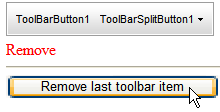
7. Click the “Remove last toolbar item” button and notice the last toolbar item has been removed.
 This Topic Illustrates the Following:
Once your project is built, click the “Remove last toolbar item” button at run-time and notice that it removes the last toolbar item from the C1ToolBar control.
|