In the Formatting dialog box, users can specify the font family, size, color, text effects, and decoration.
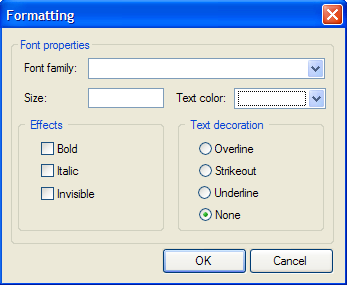
Font properties
|
Font family |
Click the drop-down arrow next to Font family to select from the list of available font families. |
|
Size |
Enter a number to specify the text size. |
|
Text color |
Click the drop-down arrow next to Text color to select from Web, System, or custom colors. |
Effects
Select the Bold, Italic, or Invisible check boxes to add the effect to the text. If Invisible is selected, the text will be hidden in Preview mode.
Text decoration
Select Overline, Strikeout, Underline, or None (default) to add decoration to the text.
|