Shortcut keys provide access to frequently performed commands or actions. Each action tool can have one or more shortcut key combinations.
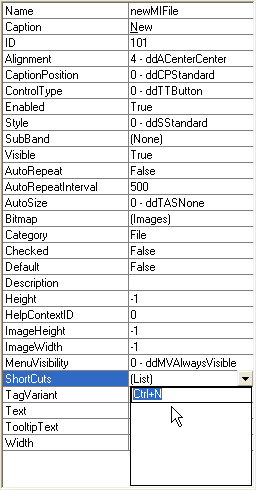
To set a tool's shortcut keys, select the tool, navigate to its Shortcuts property and click the drop-down arrow to open the shortcut keys editor. Add as many shortcuts as needed and press ENTER to save the shortcuts. You can set the following shortcuts for each tool.
| Tool | Shortcut Keys |
|---|---|
| newButton | CTRL+N |
| openButton | CTRL+O, CTRL+F12, ALT+CTRL+F12 |
| saveButton | CTRL+S, SHIFT+F12, ALT+SHIFT+F12 |
| saveasButton | F12 |
| printButton | CTRL+P, CTRL+SHIFT+F12 |
| printpreviewButton | CTRL+F2, ALT+CTRLl+I |
| undoButton | CTRL+Z, ALT+BACKSPACE |
| cutButton | CTRL+X, SHIFT+DELETE |
| copyButton | CTRL+C, CTRL+Num 0 |
| pasteButton | CTRL+V, SHIFT+INSERT |
| clearButton | Delete |
| selectallButton | CTRL+A, CTRL+Num 5 |
| findButton | CTRL+F |
| findnextButton | Shift+F4, ALT+CTRL+Y |
| replaceButton | CTRL+H |
| fontButton | CTRL+SHIFT+F |
| boldButton | CTRL+B, CTRL+SHIFT+B |
| italicButton | CTRL+I, CTRL+SHIFT+I |
| underlineButton | CTRL+U, CTRL+SHIFT+U |
| leftButton | CTRL+L |
| centerButton | CTRL+E |
| rightButton | CTRL+R |
| contentsButton | F1 |
| whatsthisButton | SHIFT-F1 |
| See Also |
Copyright © 2006 Data Dynamics, Ltd. All Rights Reserved.