In the Page Setup dialog box, users can specify the page size and orientation, set page margins, and create headers and footers.
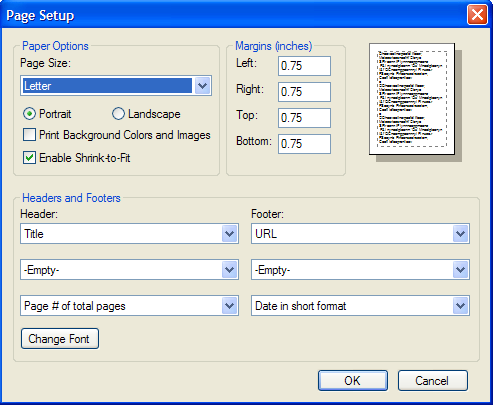
Paper Options
|
Page Size |
Click the drop-down arrow and select a paper size. |
|
Portrait or Landscape |
Select Portrait or Landscape to determine the page orientation. |
|
Print Background Colors and Images |
Select this checkbox to print background colors and pictures. |
|
Enable Shrink-to-Fit |
Select this checkbox to scale the content to fit on the page. |
Margins
Specify the page margins in the Left, Right, Top, and Bottom boxes.
Headers and Footers
Click the drop-down arrows under Header or Footer to select the header or footer to be inserted, or create your own custom header or footer. Click the Change Font button to change the header or footer font, style, and size.
|